

Highlighten

For Mac & Windows · Nothing leaves your computer

Read less.
Find more.

Highlighten marks every word you're looking for across a whole folder of PDFs, scans, Word files and spreadsheets — each word in its own color — and hands you back the pages already highlighted.

Free for 3 Word, text or HTML files · Pro $19.99 once · macOS 14 or later · Windows 10 & 11

PDF & scanned PDFWord · DOC · ODT · RTFExcel XLSX · XLSMHTML · TXT · Markdown · CSVAny language, incl. Chinese, Japanese & Thai

A marked page

Five words, five colors, one glance.

Every match is marked and numbered in the order you'd read it, so you can say “see 4” in a review and everyone finds it.

indemnify · 3 matches termination · 2 matches governing law · 1 match 30 days · 2 matches confidential · 1 match

12.1 Either party may give notice of termination1 with 30 days2 written notice. The Supplier shall indemnify3 the Client against claims arising from the Services.

12.2 On termination4, the Client shall pay fees accrued to that date within 30 days5. Clauses 9 and 11 survive.

13. This Agreement is subject to the governing law6 of England and Wales. Neither party shall indemnify7 the other for indirect loss, save that the Supplier shall indemnify8 for breach of confidential9 obligations.

How it works

A pile of files in. The pages that matter out.

  1. 1

    Drop a folder

    Every PDF, scan, Word file and spreadsheet inside is read on your computer. Scans are read with on-device text recognition.

  2. 2

    Type your words

    As many words and phrases as you need, one per line. Each gets its own highlighter; pick from sixteen inks.

  3. 3

    Read, then print

    Files are ranked by how many of your words they contain. Read each match in context, then print or export a highlighted PDF.

The whole folder, sorted by what matters.

Coverage shows how many of your words each file contains. Click one to read every match in place.

Who it's for

For people who read for a living — and would rather not.

A smiling office administrator at her desk with a laptop and a stack of highlighted documents

Made for office and admin work.

Admin teams check the same names, dates, reference numbers and clause titles in document after document. Highlighten turns that into one pass — every word marked, counted and ready to print.

01

Recruiting

Drop in the CV folder, type the must-have skills, and sort candidates by how many they mention. Send the hiring manager highlighted copies.

SwiftKubernetesPostgreSQL

02

Legal & compliance

Mark the clauses you check in every contract, then print the bundle highlighted and numbered for review.

indemnifyterminationliability

03

Research

Find which papers in a reading pile mention your terms, and read each one in context before you open it.

cohortplacebofollow-up

04

Tenders & procurement

Check a tender pack or a stack of bids against every requirement, and see at a glance which ones cover them all.

ISO 27001warrantydelivery date

Highlighted copies · Pro

Print it the way you'd mark it by hand.

Choose a style before you print or export. The text underneath stays sharp and searchable, and your original file is never changed.

Rectangle

the contract term

Rounded

the contract term

Pill

the contract term

Hand-painted

the contract1 term

Everything it does

A quiet tool with a long reach.

Every format
PDF, scanned PDF, Word, DOC, ODT, RTF, Excel, HTML, text, Markdown and CSV — mixed in one folder.
Scans
Read with on-device text recognition. No upload, no waiting on a server.
Sixteen inks
Each word gets its own highlighter color. Click a word to change it.
Word lists Pro
Save a list per role, client or project, and switch with ⌘1–9 (Ctrl+1–9 on Windows).
On any screen Pro
Press ⌃⌥H (Ctrl+Alt+H on Windows) to mark your words over the app in front — mail, browser, chat.
Preview
See the highlighted copy inside the app before you print it.
Precise matching
Whole words, match case and ignore accents — “cafe” finds “café”.
CSV export Pro
Take the results table into a spreadsheet or your hiring system.

Also for Windows · Pending approval

Same highlighter, now on Windows.

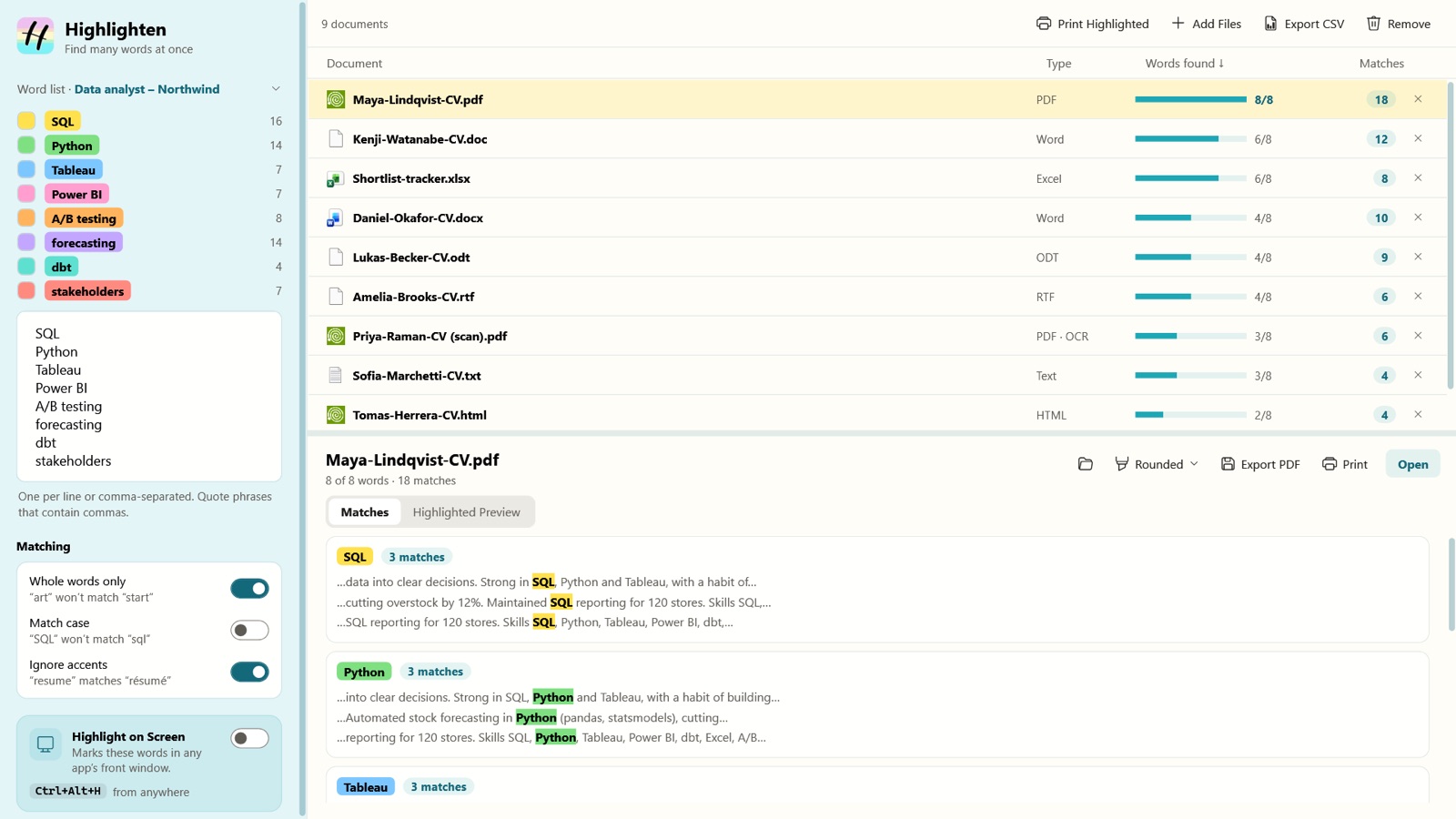
Built on the same matching engine as the Mac app, so the same words in the same files give the same results.

Highlighten for Windows: a word list on the left, nine CVs ranked by how many of the words they contain, and every match in context below
Highlighten for Windows, with nine sample CVs in seven formats.
Runs on
Windows 10 (version 2004 or later) and Windows 11, on Intel, AMD and ARM PCs.
Every feature
All the formats, scans, highlighted copies in four styles, word lists and CSV export.
Scans
Read with Windows' own on-device text recognition. Nothing is uploaded.
On any screen Pro
Press Ctrl+Alt+H to mark your words in the window in front.
“Your CVs, contracts and client files never leave your computer.”

Every document is read and searched on your own computer. No upload, no account, no record of what you searched for. Privacy policy

Price

Free to try. $19.99 once for Pro.

Free

$0
  • Up to 3 documents at a time
  • Word (.docx), text and HTML files
  • Unlimited words and colors
  • Highlighted preview in the app
Get it free

Pro Lifetime

$19.99

One-time payment. Yours for life. Try it free for 7 days.

  • Unlimited documents
  • Every format: PDF and scans, Excel, DOC, ODT, RTF, Markdown, CSV
  • Highlighted print and PDF copies
  • Highlight on Screen (⌃⌥H, Ctrl+Alt+H)
  • Saved word lists and CSV export
Start the free trial

Pro on Mac

Download Highlighten free from the Mac App Store, then buy Pro inside the app. Apple handles the payment, and Restore Purchases brings Pro back on any Mac signed in with the same Apple Account.

Mac App Store · coming soon

Pro on Windows

Download Highlighten free from the Microsoft Store. Buy a Pro licence key here with secure Stripe checkout, then enter it in the app: Try Pro free → Activate.

Buy Pro for Windows — $19.99

One-time payment, no subscription. Your licence key is emailed to you from license@amiplay.net right after checkout. Card details are handled by Stripe; we never see them.

Questions, answered.

Does it change my original files?

No. Highlighted copies are new PDFs; your originals stay exactly as they were.

Can it read scanned PDFs?

Yes, with the on-device text recognition built into macOS and Windows. Scans are part of Pro.

Does it work with Chinese, Japanese and Thai?

Yes. Languages written without spaces use whole-word matching, so you find the word you typed, not pieces of longer ones.

How does the free trial work?

Start the 7-day trial from inside the app and every Pro feature unlocks. Nothing is charged. When it ends, Highlighten keeps working as the free version unless you buy Pro.

Is Pro a subscription?

No. Pro is a one-time purchase of $19.99, and it's yours for good. On a Mac you buy it in the app through the Mac App Store; on Windows you buy a licence key on this site.

Is there a Windows version?

Yes. Highlighten for Windows does everything the Mac app does, on Windows 10 (version 2004 or later) and Windows 11. Like the Mac app, it's pending approval and will be in the store soon. A browser extension is coming too.

Does one Pro purchase cover both Mac and Windows?

No. Pro on Mac is bought through the Mac App Store and Pro on Windows with a licence key from this site, so each is a separate $19.99 purchase.

How do I move my Windows licence to another PC?

On the old PC, open the upgrade screen and choose Remove Licence. Then enter the same key on the new PC. If the old PC is gone, email info@amiplay.com with your key.

Put the highlighter down.

Coming soon · macOS 14 or later · Windows 10 & 11 · Free to download · Pro $19.99 once